Integrating an AI Trading Signals API with MetaTrader 5: An End-to-End Python Implementation

Integrating an AI Trading Signals API with MetaTrader 5: An End-to-End Python Implementation
Modern quantitative trading workflows increasingly separate intelligence generation from trade execution. While platforms like MetaTrader 5 (MT5) remain industry benchmarks for order routing, multi-asset broker connectivity, and execution speed, their native scripting environment (MQL5) often creates friction when integrating external machine learning models, computer vision pipelines, or multi-asset telemetry.
By leveraging an AI trading signals API alongside the official MetaTrader5 Python package, developers can build an institutional-grade architecture: real-time signals, multi-timeframe analytics, and computed indicators originate in a cloud-native API and route directly to local MT5 execution terminals in sub-second latency.
In this technical guide, we build a production-ready Python execution bridge that authenticates with the Trade AI REST API, monitors high-probability signals, validates them against dynamic risk criteria, and dispatches compliant order payloads to an active MT5 terminal.
System Architecture Overview
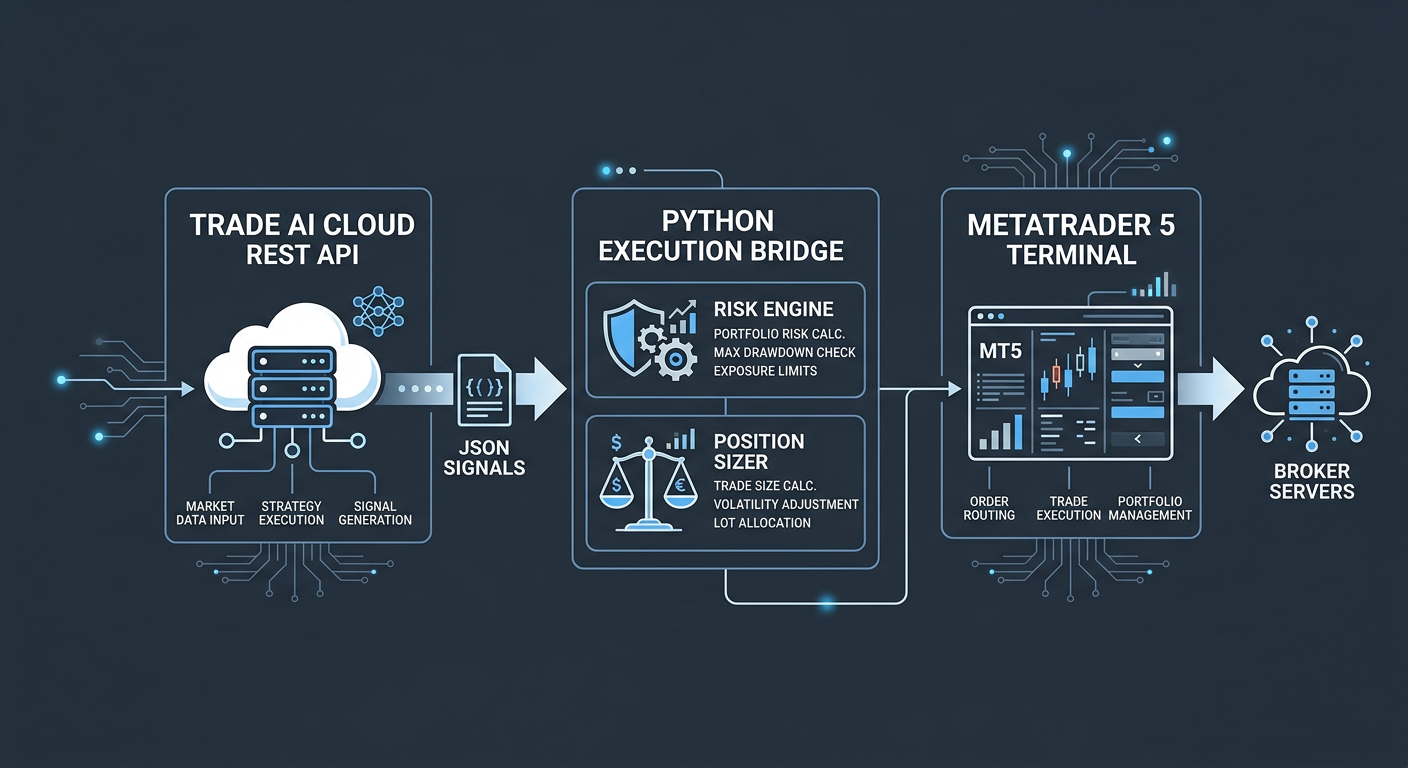
Before writing code, consider the interaction flow between the cloud intelligence layer and the local execution engine:
- Signal Intelligence Layer (Trade AI): Cloud-native microservices evaluate multi-asset market data, computing programmatic indicators and deep learning pattern alerts across equities, forex, and digital assets.
- Middleware Client (Python Script): Periodically queries the Trade AI REST API endpoints (or listens to streaming webhooks), normalizes payloads, and runs local pre-trade risk management (e.g., balance validation, maximum spread enforcement).
- Execution Layer (MetaTrader 5 Terminal): The local MT5 runtime receives structured orders via the IPC (Inter-Process Communication) pipe exposed by the official Python library, handles margin verification, and submits orders to the broker.
Prerequisites and Environment Setup
Ensure your development machine runs a 64-bit Windows environment (native MT5 architecture) or a properly configured Wine/Windows container on Linux. You will need:
- Python 3.9 through 3.11
- MetaTrader 5 desktop client installed and logged into a demo or live broker account
- A valid API Key from Trade AI Services
Initialize your virtual environment and install the required packages:
python -m venv venv
source venv/Scripts/activate  # On Windows: venv\Scripts\activate
pip install MetaTrader5 requests python-dotenv
Create a .env file to store credentials securely:
TRADE_AI_API_KEY=your_trade_ai_token_here
MT5_ACCOUNT=12345678
MT5_PASSWORD=your_broker_password
MT5_SERVER=YourBroker-Demo
Step 1: Initializing the MetaTrader 5 Connection
The Python library communicates with the MT5 terminal via dynamic-link libraries. MT5 must be running or initialized headlessly with valid credentials.
Create mt5_bridge.py and set up the initialization routine:
import os
import sys
import MetaTrader5 as mt5
from dotenv import load_dotenv

load_dotenv()

def initialize_mt5() -> bool:
    """Initializes the MT5 terminal connection using environment credentials."""
    account = int(os.getenv("MT5_ACCOUNT"))
    password = os.getenv("MT5_PASSWORD")
    server = os.getenv("MT5_SERVER")

    if not mt5.initialize():
        print(f"[ERROR] MT5 initialization failed: {mt5.last_error()}")
        return False

    authorized = mt5.login(login=account, password=password, server=server)
    if not authorized:
        print(f"[ERROR] Failed to authorize account #{account}: {mt5.last_error()}")
        mt5.shutdown()
        return False

    terminal_info = mt5.terminal_info()
    print(f"[INFO] Connected to {terminal_info.name} (Build {terminal_info.build})")
    return True
Step 2: Fetching Intelligence from the AI Trading Signals API
The Trade AI platform provides access to pre-calculated patterns, trend-bias metrics, and validated signals via our real-time market data REST API. Each signal payload typically contains:
symbol: The standardized asset identifier (e.g.,EURUSD,BTCUSD).action: Directional bias (BUYorSELL).confidence: Normalized model output score (0.0 to 1.0).suggested_sl: Recommended dynamic stop loss based on volatility (ATR).suggested_tp: Take profit target derived from key structural liquidity.
Implement the REST client to ingest signals:
import requests
from typing import Optional, Dict, Any

TRADE_AI_BASE_URL = "https://tradeai.smartchain.consulting/api/v1"
API_KEY = os.getenv("TRADE_AI_API_KEY")

def get_latest_signals(asset_class: str = "forex", min_confidence: float = 0.80) -> Optional[Dict[str, Any]]:
    """
    Fetches latest AI-curated signals matching confidence threshold.
    """
    headers = {
        "Authorization": f"Bearer {API_KEY}",
        "Content-Type": "application/json"
    }
    params = {
        "asset_class": asset_class,
        "min_confidence": min_confidence,
        "status": "active"
    }

    try:
        response = requests.get(f"{TRADE_AI_BASE_URL}/signals/latest", headers=headers, params=params, timeout=5)
        response.raise_for_status()
        return response.json()
    except requests.exceptions.RequestException as e:
        print(f"[WARN] Failed to retrieve signals: {e}")
        return None
Step 3: Normalizing Symbols and Dynamic Risk Sizing
Brokers often alter standard tickers with prefixes or suffixes (e.g., EURUSD.r, EURUSDm). Your bridge must ensure symbol readiness and compute strict risk-managed lot sizes.
def verify_symbol(symbol: str) -> bool:
    """Checks if symbol is available in MarketWatch, enables it if needed."""
    selected = mt5.symbol_select(symbol, True)
    if not selected:
        print(f"[ERROR] Symbol {symbol} not found on broker server.")
        return False
    return True

def calculate_lot_size(symbol: str, risk_percent: float, stop_loss_points: float) -> float:
    """
    Computes dynamic lot sizing based on account balance and stop loss distance.
    """
    account_info = mt5.account_info()
    if not account_info:
        return 0.01  # Fallback to minimum micro-lot

    balance = account_info.balance
    risk_amount = balance * (risk_percent / 100.0)

    symbol_info = mt5.symbol_info(symbol)
    if not symbol_info or stop_loss_points <= 0:
        return 0.01

    point = symbol_info.point
    tick_value = symbol_info.trade_tick_value
    tick_size = symbol_info.trade_tick_size

    # Prevent division by zero if broker reports invalid tick sizes
    if tick_size == 0 or tick_value == 0:
        return symbol_info.volume_min

    price_risk_per_lot = (stop_loss_points / tick_size) * tick_value
    raw_lot = risk_amount / price_risk_per_lot

    # Clamp lot size between volume boundaries
    step = symbol_info.volume_step
    clamped_lot = max(symbol_info.volume_min, min(symbol_info.volume_max, raw_lot))
    normalized_lot = round(clamped_lot / step) * step
    return round(normalized_lot, 2)
Step 4: Constructing and Executing the MT5 Trade Request
MetaTrader 5 handles orders using the mt5.order_send() function, which requires an explicitly typed structural dictionary conforming to MQL5 standards. For deeper references on order attributes, consult the official MetaTrader 5 Python documentation.
def execute_signal(signal: Dict[str, Any], risk_percent: float = 1.0) -> bool:
    """Translates API signal into MT5 trade request and dispatches execution."""
    symbol = signal["symbol"]
    action_str = signal["action"].upper()
    confidence = signal.get("confidence", 0.0)

    if not verify_symbol(symbol):
        return False

    symbol_info = mt5.symbol_info(symbol)
    is_buy = action_str == "BUY"
    order_type = mt5.ORDER_TYPE_BUY if is_buy else mt5.ORDER_TYPE_SELL
    price = symbol_info.ask if is_buy else symbol_info.bid

    # Determine price distance for SL
    sl_price = float(signal["suggested_sl"])
    tp_price = float(signal["suggested_tp"])
    sl_distance = abs(price - sl_price)

    volume = calculate_lot_size(symbol, risk_percent, sl_distance)
    deviation = 20  # Max acceptable slippage in broker points

    request = {
        "action": mt5.TRADE_ACTION_DEAL,
        "symbol": symbol,
        "volume": volume,
        "type": order_type,
        "price": price,
        "sl": sl_price,
        "tp": tp_price,
        "deviation": deviation,
        "magic": 883100,  # Identifier for Trade AI signals
        "comment": f"TradeAI Auto [{round(confidence*100)}]",
        "type_time": mt5.ORDER_TIME_GTC,
        "type_filling": mt5.ORDER_FILLING_IOC,
    }

    result = mt5.order_send(request)
    if result.retcode != mt5.TRADE_RETCODE_DONE:
        print(f"[FAIL] Order failed for {symbol}. Code: {result.retcode}, Description: {result.comment}")
        return False

    print(f"[SUCCESS] Order executed on {symbol}. Ticket #{result.order}, Volume: {result.volume}")
    return True
Step 5: Orchestrating the Asynchronous Polling Loop
To continuously process alerts, encapsulate the operational logic inside an orchestration routine with error recovery and throttling:
import time

def run_bridge(polling_interval: int = 15):
    """Main runtime engine executing polling cycles."""
    if not initialize_mt5():
        sys.exit(1)

    print("[RUNNING] Trade AI to MT5 Bridge is operational. Awaiting signals...")
    executed_signals = set()

    try:
        while True:
            response = get_latest_signals(asset_class="forex", min_confidence=0.85)
            if response and "data" in response:
                for signal in response["data"]:
                    signal_id = signal["signal_id"]
                    if signal_id not in executed_signals:
                        print(f"[NEW SIGNAL] Ingested signal {signal_id} on {signal['symbol']}")
                        success = execute_signal(signal, risk_percent=1.0)
                        if success:
                            executed_signals.add(signal_id)

            time.sleep(polling_interval)
    except KeyboardInterrupt:
        print("\n[STOPPING] User terminated the execution bridge.")
    finally:
        mt5.shutdown()
        print("[CLOSED] Connection with MT5 terminal closed.")

if __name__ == "__main__":
    run_bridge(polling_interval=10)
Production Considerations & Edge Case Handling
When deploying algorithmic systems into live market environments, simple scripts often fail due to volatile market conditions. Address the following architectural aspects:
1. Filling Modes and Execution Policy
Brokers configure order execution differently depending on market depth: ORDER_FILLING_IOC (Immediate or Cancel), ORDER_FILLING_FOK (Fill or Kill), or ORDER_FILLING_RETURN. Query symbol_info.filling_mode to ensure your request does not get rejected with error TRADE_RETCODE_INVALID_FILL.
2. Network Latency and Heartbeats
If running on a remote cloud VPS, implement automatic reconnect logic. If the local MT5 terminal drops connection with the broker server (mt5.terminal_info().connected == False), suspend new trade actions until the broker socket re-establishes synchronization.
3. Duplicate Order Safeguards
Signals distributed via our crypto and forex signal webhook or REST feeds can refresh during market volatility. Persist signal_id entries to an SQLite or Redis instance rather than in-memory sets to maintain state across process restarts.
Conclusion
Connecting Trade AI's quantitative endpoints to MetaTrader 5 bridges the gap between state-of-the-art predictive signals and robust local order execution. By using Python as an orchestration layer, developers retain complete control over trade execution, position sizing, and risk rules while eliminating the complexities of training and maintaining on-premise AI models.
Review our pricing and tiers to select an API throughput tier matching your quantitative infrastructure needs.
Disclaimer: This guide is strictly for developer education and software integration demonstrations. Programmatic trading involves substantial financial risk. Past analytical performance is no guarantee of future returns. Test all code against sandbox demo accounts before deploying live capital.
Frequently asked questions
- Can I run this Python to MT5 bridge on a Linux server?
- The official MetaTrader5 Python library depends on Windows binaries. To run this bridge on Linux, you can run MT5 inside a Wine or Docker container with Python for Windows, or maintain the execution bridge on a dedicated Windows VPS near your broker's datacenter.
- How does the Trade AI API calculate its trading signals?
- Trade AI integrates real-time multi-asset market data, technical indicator matrices (RSI, EMA, ATR), structural support/resistance detection, and computer vision models that scan chart geometries to produce high-probability signal outputs with normalized confidence scores.
- Can I use webhooks instead of polling the REST API?
- Yes. Trade AI supports outbound webhooks for instant push event delivery. You can expose an asynchronous FastAPI or Flask endpoint locally using ngrok or a reverse proxy to ingest signals immediately upon generation.
- Does this bridge support crypto and stock execution in MT5?
- Yes, provided your MT5 broker provides tradable instruments for those asset classes. You only need to align the asset symbol strings with your broker's naming convention.