How to Build an Automated Telegram Trading Alert Bot Using Python and REST APIs

How to Build an Automated Telegram Trading Alert Bot Using Python and REST APIs
Manual chart monitoring is fundamentally inefficient. Traders operating across multiple asset classes—such as foreign exchange, equities, and digital assets—face fragmented interfaces, delayed execution, and cognitive fatigue. Automating notifications shifts your workflow from reactive screen-watching to deterministic, rule-based execution.
Telegram provides one of the most resilient, developer-friendly interfaces for real-time alerts. With its zero-overhead interface, native mobile push notifications, and robust Bot API, it serves as an ideal delivery channel for algorithmic triggers. By pairing Telegram with a high-throughput real-time market data REST API and technical indicator calculations, you can deploy a customized notification pipeline in an afternoon.
This tutorial walks through building a production-grade automated alert system using Python, the Telegram Bot API, and the Trade AI Market Intelligence API.
System Architecture Overview
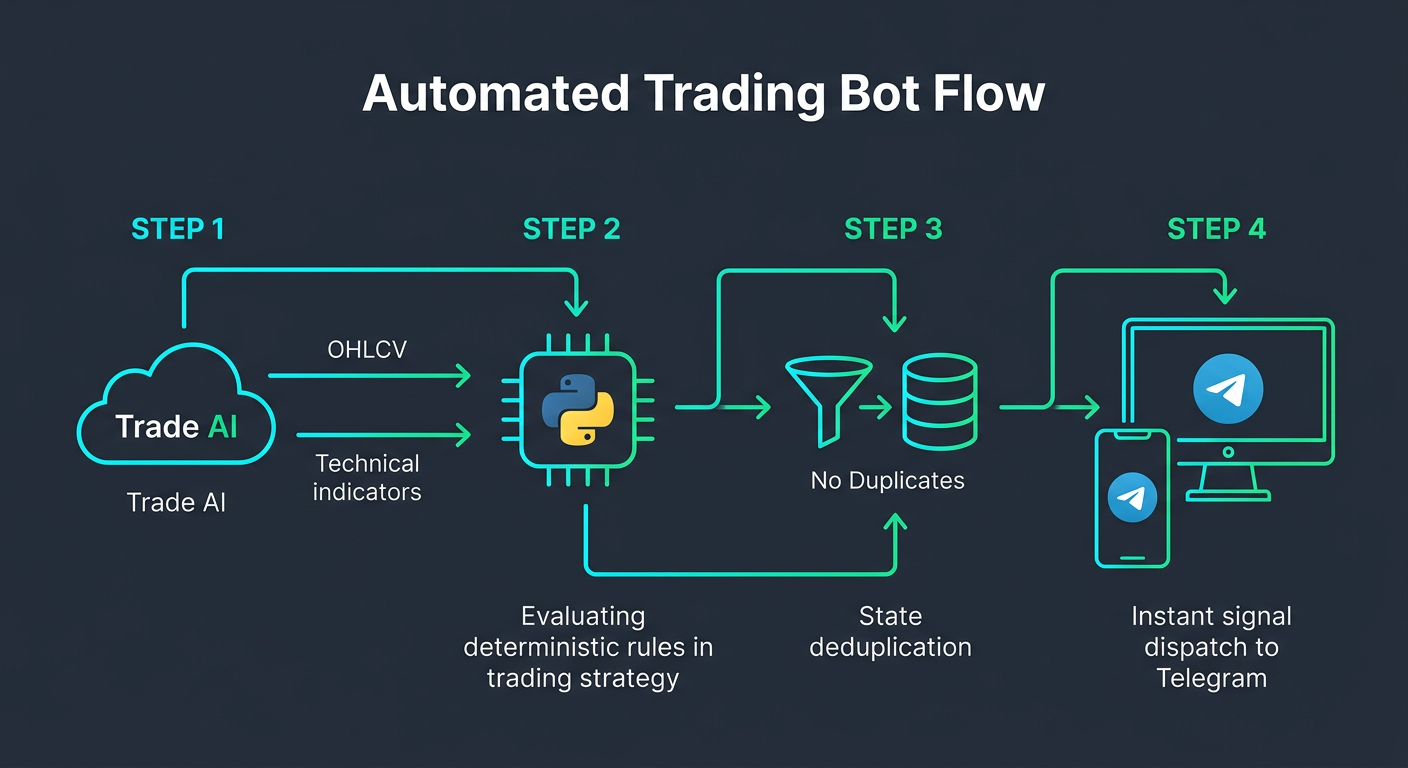
Before writing code, let us map out the data flow. A production trading alert pipeline consists of four decoupled layers:
- Data Ingestion: Polling or streaming OHLCV (Open, High, Low, Close, Volume) records across target pairs.
- Indicator & Signal Computation: Evaluating technical conditions (e.g., Relative Strength Index overbought/oversold levels, Exponential Moving Average crossovers, or multi-factor statistical models).
- State Management & Deduplication: Ensuring that an ongoing condition does not trigger spam alerts on every tick or poll interval.
- Message Dispatch: Formatting payload alerts with markdown and broadcasting them through the Telegram Bot API.
By relying on an external trading intelligence REST API to handle data normalization and indicator calculation, your local bot runtime remains lightweight and stateless.
Prerequisites
To complete this guide, verify that your development environment includes:
- Python 3.10+ installed locally or on a virtual private server.
- A Telegram account to create your bot token and target chat.
- A Trade AI API key for querying market data and automated signals.
- Basic familiarity with HTTP requests and asynchronous programming in Python.
Install the required dependencies via pip:
pip install requests python-dotenvStep 1: Provisioning Your Telegram Bot
Telegram secures bot communication via an API token generated by the central bot authority: BotFather.
- Open your Telegram client and search for
@BotFather. - Execute the
/newbotcommand. - Follow the prompts to assign a name and a unique username ending in
bot. - Copy the HTTP API token provided.
Consult the official Telegram Bot API Documentation for deeper insights into message payload structures and webhook modes.
Step 2: Fetching Market Data & Indicator Computations
Rather than computing technical indicators locally using extensive math packages, you can fetch both raw candles and calculated indicators directly from the OHLCV technical indicators API.
import os
import requests
from dotenv import load_dotenv

load_dotenv()

API_BASE_URL = "https://api.tradeai.smartchain.consulting/v1"
API_KEY = os.getenv("TRADEAI_API_KEY")

HEADERS = {
    "Authorization": f"Bearer {API_KEY}",
    "Content-Type": "application/json",
}

def get_indicator_data(symbol: str, timeframe: str = "1h") -> dict:
    endpoint = f"{API_BASE_URL}/market/indicators"
    params = {
        "symbol": symbol,
        "timeframe": timeframe,
        "indicators": "rsi,ema_20,ema_50,macd"
    }
    try:
        response = requests.get(endpoint, headers=HEADERS, params=params, timeout=10)
        response.raise_for_status()
        return response.json()
    except requests.exceptions.RequestException as exc:
        print(f"[Error] Data ingestion failed for {symbol}: {exc}")
        return {}
Step 3: Implementing the Signal Evaluation Engine
Deterministic alerts prevent emotional trade entry. Configure your strategy to evaluate RSI conditions alongside moving average trend confirmation:
from typing import Optional, Dict, Any

def evaluate_strategy(data: Dict[str, Any]) -> Optional[Dict[str, str]]:
    if not data or "indicators" not in data:
        return None

    symbol = data.get("symbol", "UNKNOWN")
    price = data.get("close_price", 0.0)
    indicators = data["indicators"]

    rsi = indicators.get("rsi", 50.0)
    ema_fast = indicators.get("ema_20", 0.0)
    ema_slow = indicators.get("ema_50", 0.0)

    if rsi <= 30.0 and ema_fast > ema_slow:
        return {
            "symbol": symbol,
            "direction": "LONG",
            "reason": f"RSI Oversold ({rsi:.2f}) with Bullish EMA Trend",
            "price": str(price),
        }

    if rsi >= 70.0 and ema_fast < ema_slow:
        return {
            "symbol": symbol,
            "direction": "SHORT",
            "reason": f"RSI Overbought ({rsi:.2f}) with Bearish EMA Trend",
            "price": str(price),
        }

    return None
You can also replace static thresholds with our machine learning models via the AI trading signals API. Learn more about pre-configured setups inside our turnkey Telegram Bot solutions.
Step 4: Dispatching Formatted Telegram Alerts
Construct a clean message payload formatted in Markdown to send triggers to your direct chat or trading community:
import os
import requests
from dotenv import load_dotenv

load_dotenv()

BOT_TOKEN = os.getenv("TELEGRAM_BOT_TOKEN")
CHAT_ID = os.getenv("TELEGRAM_CHAT_ID")
TELEGRAM_SEND_URL = f"https://api.telegram.org/bot{BOT_TOKEN}/sendMessage"

def send_trading_alert(signal: dict) -> bool:
    direction_icon = "🟢" if signal["direction"] == "LONG" else "🔴"
    message = (
        f"{direction_icon} *TRADE ALERT: {signal['direction']}*\n\n"
        f"*Asset:* `{signal['symbol']}`\n"
        f"*Price:* `${signal['price']}`\n"
        f"*Trigger:* {signal['reason']}\n"
        f"*Action:* Review positioning according to risk parameters.\n"
    )
    payload = {
        "chat_id": CHAT_ID,
        "text": message,
        "parse_mode": "Markdown",
        "disable_web_page_preview": True,
    }
    try:
        res = requests.post(TELEGRAM_SEND_URL, json=payload, timeout=10)
        res.raise_for_status()
        return True
    except requests.exceptions.RequestException as e:
        print(f"[Error] Telegram dispatch failed: {e}")
        return False
Step 5: Deduplication and Continuous Monitoring
To avoid sending alerts repeatedly while an asset stays in an overbought or oversold zone, implement an in-memory deduplication state tracking mechanism:
import time
from market_client import get_indicator_data
from strategy import evaluate_strategy
from bot_notifier import send_trading_alert

WATCHLIST = ["BTCUSDT", "ETHUSDT", "EURUSD", "NVDA"]
POLL_INTERVAL_SECONDS = 60

def run_pipeline():
    state_cache = {}
    while True:
        for symbol in WATCHLIST:
            try:
                data = get_indicator_data(symbol, timeframe="15m")
                signal = evaluate_strategy(data)
                if signal:
                    last_signal = state_cache.get(symbol)
                    current_signal = signal["direction"]
                    if last_signal != current_signal:
                        if send_trading_alert(signal):
                            state_cache[symbol] = current_signal
                else:
                    if symbol in state_cache:
                        del state_cache[symbol]
            except Exception as loop_err:
                print(f"[Pipeline Exception] {symbol}: {loop_err}")
        time.sleep(POLL_INTERVAL_SECONDS)
Production Considerations: Moving from Polling to Webhooks
While timed polling is simple to prototype, production systems should transition to a crypto and forex signal webhook architecture. Instead of querying endpoints every 60 seconds, your server listens for incoming HTTP POST events dispatched the exact millisecond conditions trigger on Trade AI's cloud infrastructure.
Disclaimer: This guide is provided strictly for educational and technical development purposes. Programmatic market data tools, automated scripts, and algorithmic signals do not constitute financial advice, investment recommendations, or portfolio management services. Always validate models through paper testing prior to allocating capital.
Frequently asked questions
- Can I deploy this Telegram trading bot on a free cloud instance?
- Yes. Because data normalization and indicator math are handled remotely by the Trade AI REST API, the Python runtime requires minimal memory and CPU, easily running on low-spec VPS instances or free tiers like Render, Railway, or AWS EC2 t4g.nano.
- How do I send signals to a public or private Telegram channel instead of a personal chat?
- Add your bot as an administrator to your target Telegram channel with permission to post messages. Then, set your TELEGRAM_CHAT_ID to the public channel username (e.g., '@my_trading_channel') or the channel's numeric ID (typically prefixed with '-100').
- Why use an indicator REST API instead of calculating indicators locally with Pandas or TA-Lib?
- Relying on Trade AI's API offloads the burden of sourcing clean historical OHLCV data, synchronizing exchange timestamps, and maintaining heavy numerical libraries. It standardizes asset data across equities, crypto, and forex into unified JSON schemas.
- What is the difference between polling and using a trading signal webhook?
- Polling queries the server at fixed intervals, which introduces latency and consumes rate limits. A webhook pushes an event to your server immediately when an indicator or pattern triggers, delivering lower latency and zero idle resource consumption.